• Home
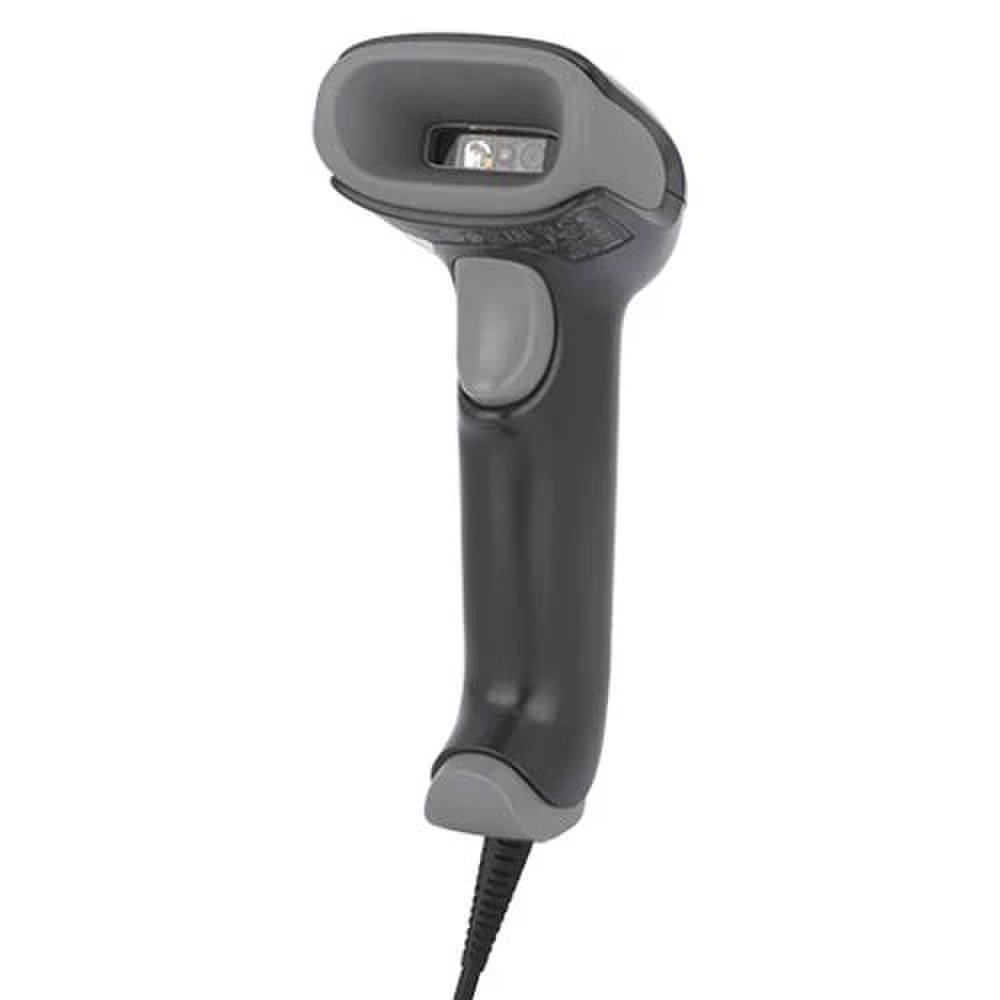
  • Honeywell Voyager XP 1470g 2D Imager Barcode Scanner with USB Kit (1470G2D-2USB-1) | New
Honeywell Voyager XP 1470g 2D Imager Barcode Scanner with USB Kit (1470G2D-2USB-1) | New

Honeywell Voyager XP 1470g 2D Imager Barcode Scanner with USB Kit (1470G2D-2USB-1) | New

SKU: 1470G2D-2USB-1-N
(0)No Reviews yet

🗹 Corded Scanner
🗹 Handheld
🗹 2D Laser Scanner
🗹 Imager, Omnidirectional Scanner

Same Day Shipping - Arrives in 3-5 Business Days
30-day Returns

$77.99 $77.99
For immediate assistance call our support team at 973-808-4588. For additional information, send an email to website@telquestintl.com.

Overview

Overview of Honeywell Voyager XP 1470g 2D Imager Barcode Scanner with USB Kit (1470G2D-2USB-1) | New


The Honeywell Voyager XP 1470g 2D Imager Barcode Scanner with USB Kit (1470G2D-2USB-1) is a corded, handheld scanner optimized for high-volume retail, healthcare, and inventory environments, delivering fast and accurate 1D/2D barcode capture including damaged or screen-displayed codes.


Honeywell Voyager XP 1470g 2D Imager Barcode Scanner with USB Kit (1470G2D-2USB-1)Features:

  • Superior 1D/2D scanning for standard barcodes, digital coupons, and low-contrast or damaged labels on mobile screens.​
  • Extended scan distance up to 24.2 inches and fast motion tolerance of 70 cm/s for efficient checkout without bending.​
  • Rugged build with 30 drops from 6 ft, 1,000 tumbles, IP52 sealing, and disinfectant-ready housing for demanding use.​
  • Plug-and-play USB connectivity with ergonomic, lightweight (4.59 oz) design to reduce fatigue during long shifts.​
  • Supports Honeywell Operational Intelligence software for scan analytics and backward compatibility with Voyager accessories.​

Best Uses for Honeywell Voyager XP 1470g 2D Imager Barcode Scanner with USB Kit (1470G2D-2USB-1):

  • High-traffic retail point-of-sale for rapid scanning of merchandise tags, loyalty cards, and mobile payments.​
  • Inventory management and stock tracking in warehouses or stores with frequent barcode reads.​
  • Healthcare settings requiring hygiene-compliant, reliable scanning of patient IDs or medication labels.

Specifications

Specifications for Honeywell Voyager XP 1470g 2D Imager Barcode Scanner with USB Kit (1470G2D-2USB-1) | New

ManufacturerHoneywell
Manufacturer Part Number1470G2D-2USB-1
Product NameHoneywell Voyager XP 1470g 2D Imager Barcode Scanner with USB Kit
Product TypeBarcode Scanner
Color
Black
Interface Type
USB
Minimum Bar Width
5 mil
Scan Element Type
2D imager - red LED
Sensor Resolution
1040 x 720
Light Source Wave Length
624 nm
Scan Mode
Single-pass
Max Working Distance
24.2 in
Skew (Degrees)
70
Pitch (Degrees)
65
Print Contrast Signal (PCS)
0.25
Decode Capability
Pharmacode 39, Code 93, Matrix 2 of 5, Code 39, ISBT 128, QR code, MaxiCode, Aztec code, Code 32, Code 39 Full ASCII, EAN/JAN-8, EAN/JAN-13, UPC-A, UPC-E, MicroPDF417, Codabar, Code 128, Code 11, Interleaved 2 of 5, PDF417, Data Matrix, TLC39, China Post, Korea Post, Codablock F, UPC-E1, UPC-E0, MacroPDF417, Hong Kong 2 of 5, GS1 DataBar Omnidirectional, GS1 DataBar Expanded, GS1 DataBar Limited, GS1 DataBar Composites, Codablock A, MSI, GS1-128, NEC 2 of 5, Straight 2 of 5, Han Xin
TTL Decoding
Decoded
Connectivity Technology
Wired
OK Notification
Beeper, LED indicator, vibration
Features
ESD (electrostatic discharge) safe
Interfaces
1 x USB - Type A
Cables Included
1 x USB cable - 5 ft
Compliant Standards
IP40
Power Consumption Operational
2 Watt
Electric Current Required
400 mA (operating), 90 mA (standby)
Width
2.4 in
Depth
3.2 in
Height
6.7 in
Weight
4.59 oz
Service & Support
Limited warranty - 5 years
Min Operating Temperature
32 °F
Max Operating Temperature
122 °F
Humidity Range Operating
0 - 95% (non-condensing)
Drop Specification
6 ft to concrete

User Guides

Frequently Asked Questions

Honeywell Voyager XP 1470g 2D Imager Barcode Scanner with USB Kit (1470G2D-2USB-1)
Frequently Asked Questions (FAQ's)


What types of barcodes can the Honeywell Voyager XP 1470g scan?
  • It can scan 1D and 2D barcodes.
  • Is the Honeywell Voyager XP 1470g compatible with my existing POS system?
  • Yes, it has USB connectivity, allowing for easy integration with most POS systems.
  • How durable is the Voyager XP 1470g?
  • It is built to withstand daily use in harsh environments, with a strong construction that ensures long-term dependability.
  • What is the scanning range of the Voyager XP 1470g?
  • The scanning range varies by barcode type, but it generally provides a wide range for capturing barcodes from a distance.
  • Does the Honeywell Voyager XP 1470g require any special software?
  • It is a plug-and-play device, which means that basic operation usually does not require any additional software; however, advanced features may require software.
  • Can the Voyager XP 1470g scan barcodes from screens?
  • Yes, it can scan barcodes on mobile device screens and monitors.
  • What is the warranty period for the Honeywell Voyager XP 1470g?
  • The standard warranty period is three years, though this varies by region and distributor.
  • Is the Honeywell Voyager XP 1470g suitable for outdoor use?
  • It is primarily intended for indoor use, but it can be used outdoors on occasion under moderate conditions.
  • What are the power requirements for the Voyager XP 1470g?
  • It is powered by a USB connection, eliminating the need for an external power supply.
  • Can the Voyager XP 1470g be used in healthcare settings?
  • Yes, it is appropriate for healthcare applications like patient care and inventory management.
  • How do I update the firmware on the Voyager XP 1470g?
  • Firmware updates are typically performed using Honeywell's software tools or downloaded from their website.
  • Does the Voyager XP 1470g support hands-free scanning?
  • Yes, it is compatible with an optional stand for hands-free scanning.
  • What is the weight of the Honeywell Voyager XP 1470g?
  • The scanner weighs about 130 grams (4.6 oz).
  • Can the Voyager XP 1470g decode damaged or poorly printed barcodes?
  • Yes, it is intended to handle difficult barcodes, including those that are damaged or poorly printed.
  • Is the Voyager XP 1470g compatible with both Windows and Mac systems?
  • Yes, it works with both Windows and Mac operating systems.
  • How do I clean the Honeywell Voyager XP 1470g?
  • For regular cleaning, use a soft, dry cloth. To clean more thoroughly, follow the manufacturer's instructions and use approved cleaning agents.
  • What is the scan rate of the Voyager XP 1470g?
  • The scanner has a fast scan rate, which increases productivity by rapidly capturing barcodes.
  • Does the Voyager XP 1470g come with a stand?
  • The stand is an optional accessory that is sold separately.
  • Can the Voyager XP 1470g be used in a cold storage environment?
  • It can operate in a variety of temperatures, but in extreme conditions, such as cold storage, keep it within the specified operating temperature range.
  • How do I troubleshoot connection issues with the Voyager XP 1470g?
  • Check that the USB cable is properly connected, check the power supply, and refer to the user manual for additional troubleshooting steps. If the problem persists, contact Honeywell support.

  • Ratings & Reviews

    No reviews available

    Be the first to Write a Review
